
Design Home™: House Makeover
Crowdstar IncSimulation
4.3203.55K Reviews
- Version
- 1.135.066
- Installs
- 50.00M
- Age Rating
- Everyone
Screenshots
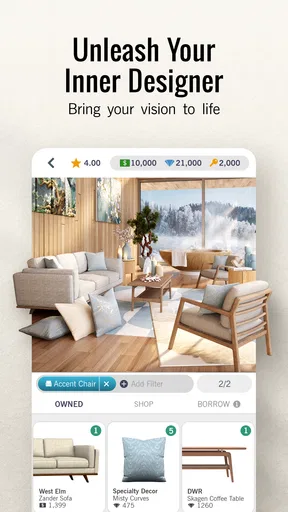

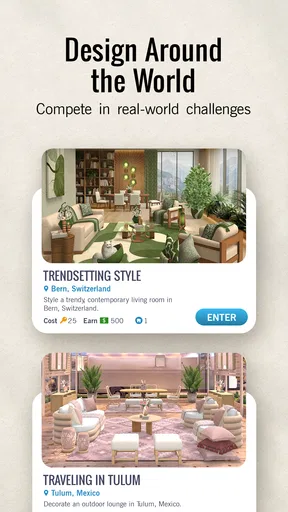
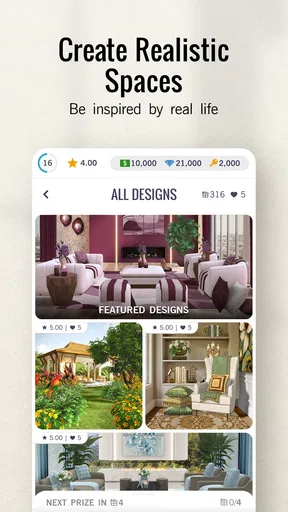

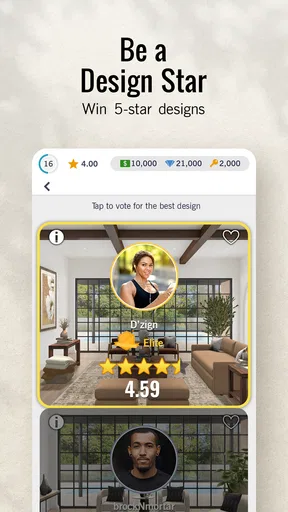
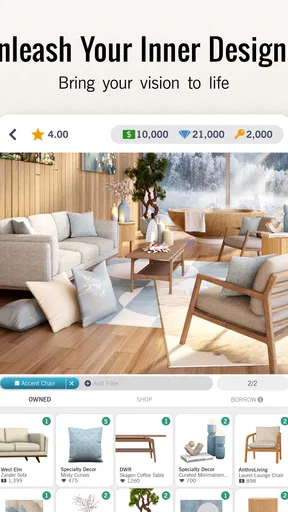

Our Review of Design Home™: House Makeover
 Analysis by Appyee
I judge a design game by what it asks me to do in the first few minutes and whether those decisions stay interesting after the novelty wears off. Here, the appeal is clear: I get to shape rooms through furniture and décor choices, then see how my taste compares with other players’. That makes Design Home™: House Makeover a natural fit for anyone who enjoys interior styling more than fast reactions or complicated controls.
What the first designs ask of you
The early challenges make the basic loop easy to understand: look at a room, choose pieces that suit the brief, and try to make the result feel coherent. That simple start is useful if, like me, you enjoy experimenting but do not want to learn a complicated building tool before you can begin. The focus is on selecting and combining furnishings, not constructing a house from the ground up.
I find the most satisfying first step is to settle on a direction before placing items. A restrained palette, a clear focal point, and a consistent style usually make a room feel more intentional than choosing every attractive object independently. That small bit of planning also makes it easier to decide which options are worth using when a project gives you a budget.
How progress feels from one room to the next
Progress is less about mastering a long list of controls and more about getting better at reading a brief. A beachside setting suggests a different mood from an urban loft, and the fun comes from adapting rather than relying on one look for every assignment. Seeing other players’ entries through voting gives me another way to notice combinations I might not have considered.
Voting also changes the pace. When I want a break from making choices, I can look at other designs and take in how people interpret the same kind of task. The reward for participating gives that activity a practical purpose in the game, while the comparison can provide inspiration. I treat votes as a snapshot of taste, though, not a definitive lesson in design: a popular approach is not automatically the only good one.
Where the challenge and spending pressure meet
The challenge comes from balancing a room’s overall look with the available choices and budget. That can encourage useful restraint, but it can also become frustrating when a particular item you want is locked or feels out of reach. The game is free to play, with in-app purchases ranging from $0.99 to $199.99 per item, so it is worth deciding in advance whether you are comfortable spending anything. I would start by treating paid purchases as optional, rather than assuming every appealing design requires them.
The pacing works best when I approach each room as a short creative exercise instead of a demand to complete everything immediately. If I am stuck, I can pause and come back with a fresh eye rather than spending just to force a preferred look. A practical tactic is to choose the room’s main visual idea first, then use the remaining choices to support it; this can prevent an attractive but mismatched item from taking over the whole design.
Who is likely to enjoy it
This is a good match for casual players who like décor, visual comparison, and low-pressure creative decisions. It can also be a handy source of styling ideas if you are rearranging a real room: I would use it to test broad combinations of color and furniture mood, then check actual measurements and practical needs separately. The in-game scene is a source of inspiration, not a substitute for planning a real purchase.
If you want free-form construction, detailed architectural control, or a game driven by action and constant mechanical progression, this may not be the right choice. Its appeal rests on furnishing themed rooms and responding to challenges. Players who dislike limited item access or feel compelled to buy their way to a particular look may also prefer a less purchase-oriented creative tool.
Getting Started with Design Home™
First things first, downloading Design Home™: House Makeover was a breeze. It’s available on both Android and iOS, so you can get started no matter what device you’re rocking. Once I had it installed, I jumped right into the world of design challenges. And let me tell you, the app doesn’t waste any time throwing you into the thick of it. You’re immediately tasked with decorating various rooms using a range of furniture and décor items.
Exploring the Features
The app is packed with features that make the design process both exciting and a tad addictive. You’re given a budget for each project, and the challenge is to stay within that budget while creating a space that’s both functional and aesthetically pleasing. The items you can choose from are stunning and look like something straight out of a high-end catalog.
One of my favorite features is the ability to vote on other users’ designs. Not only do you get to see a wide array of styles and ideas, but you also earn in-game currency by participating. It’s a win-win. Plus, the competitive element adds a nice touch, making you want to create the best room possible.
The Design Experience
Designing in the app feels intuitive. You can easily move items around, swap them out, or try different color schemes until you find something that clicks. The touch controls are smooth, and the graphics are impressively realistic. It’s almost like playing with a virtual dollhouse, only way more sophisticated.
But what really sets this app apart is the realism of the items. The furniture and décor are true to life, and you can actually purchase them if you fall in love with a particular piece. This seamless blend of virtual and real-world shopping is pretty neat.
Challenges and Creativity
The app throws many design challenges your way—think beachside bungalows, urban lofts, or cozy cottages. Each one requires a different approach, pushing you to think outside the box and experiment with styles you might not usually go for. It’s a wonderful way to stretch your creative muscles.
However, a heads up: some items are locked behind a paywall, which can be a bit frustrating if you’re on a tight budget. It sometimes feels like certain designs are just out of reach unless you’re willing to spend a little extra. But hey, that’s the nature of freemium apps, right?
Community and Interaction
The community aspect of Design Home™ is a big draw. Engaging with other users, sharing tips, and seeing how others tackle the same challenge adds a social element that keeps you coming back. Plus, the voting system means you’re constantly exposed to fresh ideas and trends.
What the numbers say about its audience
This is a simulation game from Crowdstar Inc, and its audience is substantial: it has over 50 million installs, an average rating of 4.3, and around 1.2 million ratings. Those figures suggest a well-established place among mobile décor games, though popularity alone does not tell me whether its spending model or challenge format will suit every player.
It is free to download and rated Everyone, which makes it easy to try as a casual creative game. The current version is 1.128.079, and it requires Android 7.0 or later on Android devices. The game first appeared on November 16, 2016, so it has had time to build a large community around its room-design format. I would still approach it as a focused decorating game rather than a complete home-design planner.
A practical way to make each session count
For an ordinary evening, I might open the game while waiting for dinner, complete one room, and spend a little time voting on other entries before putting my phone away. That is a more comfortable rhythm than treating every challenge as homework. It also gives me a chance to separate the creative part from the urge to chase every available reward or item.
When I am designing, I try to compare choices by role rather than by how impressive each item looks alone. For example, I first decide what should draw attention, then check whether the other pieces reinforce that choice or compete with it. If the room starts to feel busy, removing a strong but unrelated accent can help more than adding another decorative object. This is a useful habit in the game and in a real room, where visual clutter can undermine an otherwise attractive palette.
Another helpful approach is to save experimentation for challenges where I am not attached to a particular outcome. A brief that pushes me toward a style I do not normally choose is a good opportunity to try a different color balance or furniture mood. By contrast, when I have a clear idea, I can spend my attention checking how the available pieces work together instead of changing direction repeatedly. The game’s themed assignments make those two kinds of play feel distinct.
How it differs from other decorating games
Compared with open-ended room planners, this game puts more emphasis on responding to a challenge and choosing among available furnishings than on measuring a real space or designing a full floor plan. That makes it quicker to pick up and more social, especially with voting, but less useful if my main goal is to plan a renovation accurately. Compared with a traditional life or building simulation, the pleasure here is in styling a finished scene rather than managing a household or shaping an entire world.
That distinction matters if you are deciding what to install. I would choose this when I want polished visual choices, themed prompts, and a quick way to compare styles. I would use a dedicated planning tool for room dimensions, layout constraints, or purchase lists, and choose a broader building game if I wanted to create structures freely. The right alternative depends on whether I want inspiration, practical planning, or a construction sandbox.
Keeping the game enjoyable without overspending
The main trade-off is that a tempting piece can make a challenge feel narrower when it is not readily available. I recommend deciding on a spending boundary before playing and sticking to it, especially if collecting furnishings is part of what makes the game appealing. The item prices span from $0.99 to $199.99, so purchases are not all at the same scale; a deliberate pause before buying is sensible. I would also avoid treating a single vote result as a reason to spend more. The point is to develop a room that feels considered, not to chase approval at any cost.
Players often wonder whether they need to pay to enjoy the core activity. I can recommend trying the free experience first and seeing whether the available choices and pace are satisfying on their own. Spending may widen what is accessible, but it is not a sensible shortcut if the budget pressure already feels uncomfortable. Likewise, anyone hoping to turn the game into a precise shopping guide should remember that a convincing visual match does not establish whether an item will fit a real home or suit its day-to-day use.
What the community can—and cannot—teach
Voting gives the game a useful social layer, but I get the most from it when I look for patterns rather than copying a winning arrangement. I might notice that several entries use a calmer palette, or that a focal piece reads more clearly when its surroundings are simpler. Those observations can help me make a better next attempt without reducing design to a popularity contest. Since people bring different tastes to the same brief, the variety is part of the value.
The community is also a source of fresh references when I run out of ideas. I can browse designs, note combinations I would not have tried, and then adapt the general idea to the items I have available. That last step matters: reproducing a look item for item may be impossible or unnecessary, while borrowing its balance of color and texture can still lead to a satisfying room.
Who should pass, and what to expect
I would skip this if I primarily want unrestricted building, detailed architectural tools, or a game in which skill comes from quick decisions and precise controls. I would also be cautious if locked furnishings are likely to make me feel that I must pay to express my taste. The best fit is someone who enjoys short styling tasks, accepts that each challenge has boundaries, and sees other players’ work as inspiration rather than a scorecard.
Parents considering it for a younger player can note that its content rating is Everyone, while still keeping an eye on the in-app purchase options. For an adult who simply wants a calm creative break, that same structure can be a plus: each room provides a clear prompt, and voting offers a second activity when I do not feel like designing. It is a lighter choice than a full renovation simulator, but that narrower scope is also why it works well in small sessions.
Wrapping It Up
In the end, Design Home™: House Makeover offers a delightful escape into the world of interior design. Whether you’re a hardcore décor fan or just looking for a fun way to pass the time, this app delivers. It’s visually stunning, creatively stimulating, and just plain fun. Sure, there are some in-app purchases, but with patience and a bit of budgeting, you can have a blast without spending a dime.
So, if you're ready to unleash your inner designer, give this app a try. Who knows? You might just discover a hidden talent for creating beautiful spaces. Happy decorating!
Verdict
Strengths of Design Home™: House Makeover
- Intuitive user interface for easy navigation.
- Vast selection of furniture and decor items.
- Regular updates with new design challenges.
- Realistic 3D graphics enhance the experience.
- Community voting for design inspiration.
Limitations of Design Home™: House Makeover
- In-app purchases can be costly.
- Requires constant internet connection.
- Limited free item selection.
- Energy system limits playtime.
- Ads can interrupt gameplay.
Other Releases by Crowdstar Inc
View All
Covet Fashion: Dress Up Game
Casual3.8
Similar Picks in This Category
View All
Truckers of Europe 3
Wanda Software4.3

Town Building Life Simulator
XGame Global4.2

Fidget Toys Trading・Pop It 3D
Freeplay Inc4.7

Sculpt People
CrazyLabs LTD4.4

Scary Teacher 3D
Z & K Games4.2

Hair Tattoo: Barber Shop Game
CASUAL AZUR GAMES4.3
Frequently Asked Questions
What is Design Home™: House Makeover?
Design Home™: House Makeover is a mobile game available on Android and iOS platforms that allows players to unleash their interior design creativity. Players can decorate virtual homes using real-world furniture and decor brands, participate in daily design challenges, and connect with a community of design enthusiasts.
Is Design Home™ free to play?
Design Home™ is free to download and play, but it offers in-app purchases. These purchases can enhance the gaming experience by providing additional resources such as diamonds and cash to buy premium furniture and decor items. However, players can still enjoy the game without making any purchases.
What are the key features of Design Home™?
Key features of Design Home™ include a wide selection of real-life furniture and decor items, daily design challenges, and the ability to vote on other players' designs. The game also allows players to connect with a design community and gain inspiration from others' work, providing an engaging and interactive experience.
Can I play Design Home™ offline?
Design Home™ requires an internet connection to play. This is necessary to access daily challenges, update the content, and interact with the community features. An online connection ensures that players can fully enjoy all the features and stay updated with the latest design trends.
How do I earn resources in Design Home™?
Players can earn in-game currency like cash and diamonds by participating in design challenges, completing daily tasks, and voting on other players' designs. Additionally, players can watch ads or make in-app purchases to acquire more resources, which can be used to purchase premium items for their designs.
Play our best games!


